Launch Game
Game Authorization Modes
N11s supports two kinds of game launch authorization modes:
- URL scheme mode is for iOS, Android and browser, it uses the token parameters to authorize and login.
- Web lobby mode is a responsive web page which uses token parameters to authorize and login.
URL Scheme
URL scheme is an ordinary method for game launch. Player is required to login via the operator’s website and launch the game through the operator’s game lobby page.
Note: Operator is required to provide VerifySession[1] API for operator’s player session authentication
With URL Scheme method, N11s offer two types of URL that allow tenant to launch the game
- Launch a specific version
- Always launch latest version
N11s prefers that a tenant launch a game based on the version that N11s responds to through API ListGame & GetGame, The tenant's player will have the best experience with the version N11s preferred tenant to use to launch the game. If a tenant chooses to use the latest version, N11s will not guarantee the best experience for the tenant's player.
[New] Launch a specific version
API URL : {n11s_static_domain}/games/{game_id}/{version}/index.html
HTTP method : GET
Note: On the URL, index.html is added
| Parameter name | Data Type | Mandatory | Description |
|---|---|---|---|
| n11s_static_domain | String | Yes | Provided to you on your N11s Back Office |
| game_id | String | Yes | Unique identity for each game[2] |
| version | String | Yes | Version that apply to you and you can get it on your Back Office or via API[2] |
Parameters: ?language={language}¤cy={currency}&tenant_id={tenant_id}#tenant_player_token={tenant_player_token}
| Parameter name | Data Type | Mandatory | Description |
|---|---|---|---|
| language | String | No | Display language of game[3] Default: en (If you don't pass a language or the language is not supported) |
| currency | String | No | Display language of game[4] Default: usd |
| tenant_id | String | Yes | Your Tenant ID, you can get it on N11s Back Office |
| tenant_player_token | String | Yes | Your player's token, pass it via URL of iframe do to VerifySession inside the game Note We use URL Fragment (#) instead query string. |
API URL : {n11s_static_domain}/games/{game_id}/{version}/index.html?language={language}¤cy={currency}&tenant_id={tenant_id}#tenant_player_token={tenant_player_token}
HTTP method : GET
In the new version, we changed tenant_player_token to a URL fragment rather than a query string. The reason is:
- Support cache content based on query string parameters.
- Enhance security: prevent leak player token in server log and third-party services.
[Deprecated] Launch a specific version
This section belongs to the legacy version and will be deprecated soon, we strongly recommend use the new way above.
API URL : {n11s_static_domain}/games/{game_id}/{version}/
HTTP method : GET
URL
| Parameter name | Data Type | Mandatory | Description |
|---|---|---|---|
| n11s_static_domain | String | Yes | Provided to you on your N11s Back Office |
| game_id | String | Yes | Unique identity for each game[2] |
| version | String | Yes | Version that apply to you and you can get it on your Back Office or via API[2] |
URL Parameters
| Parameter name | Data Type | Mandatory | Description |
|---|---|---|---|
| language | String | No | Display language of game[3] Default: en |
| currency | String | No | Display language of game[4] Default: usd |
| tenant_id | String | Yes | Your Tenant ID, you can get it on N11s Back Office |
| tenant_player_token | String | Yes | Your player's token, pass it via URL of iframe do to VerifySession inside the game |
[Deprecated] Launch latest version
API URL : {n11s_static_domain}/games/{game_id}/
HTTP method : GET
Web Lobby
Web Lobby provides some UIs such as profile, list games (with support for filtering and searching) and play game. There are two options to load Web Lobby
- Load via SDK
- Load via an URL
Result after integrate via the SDK:
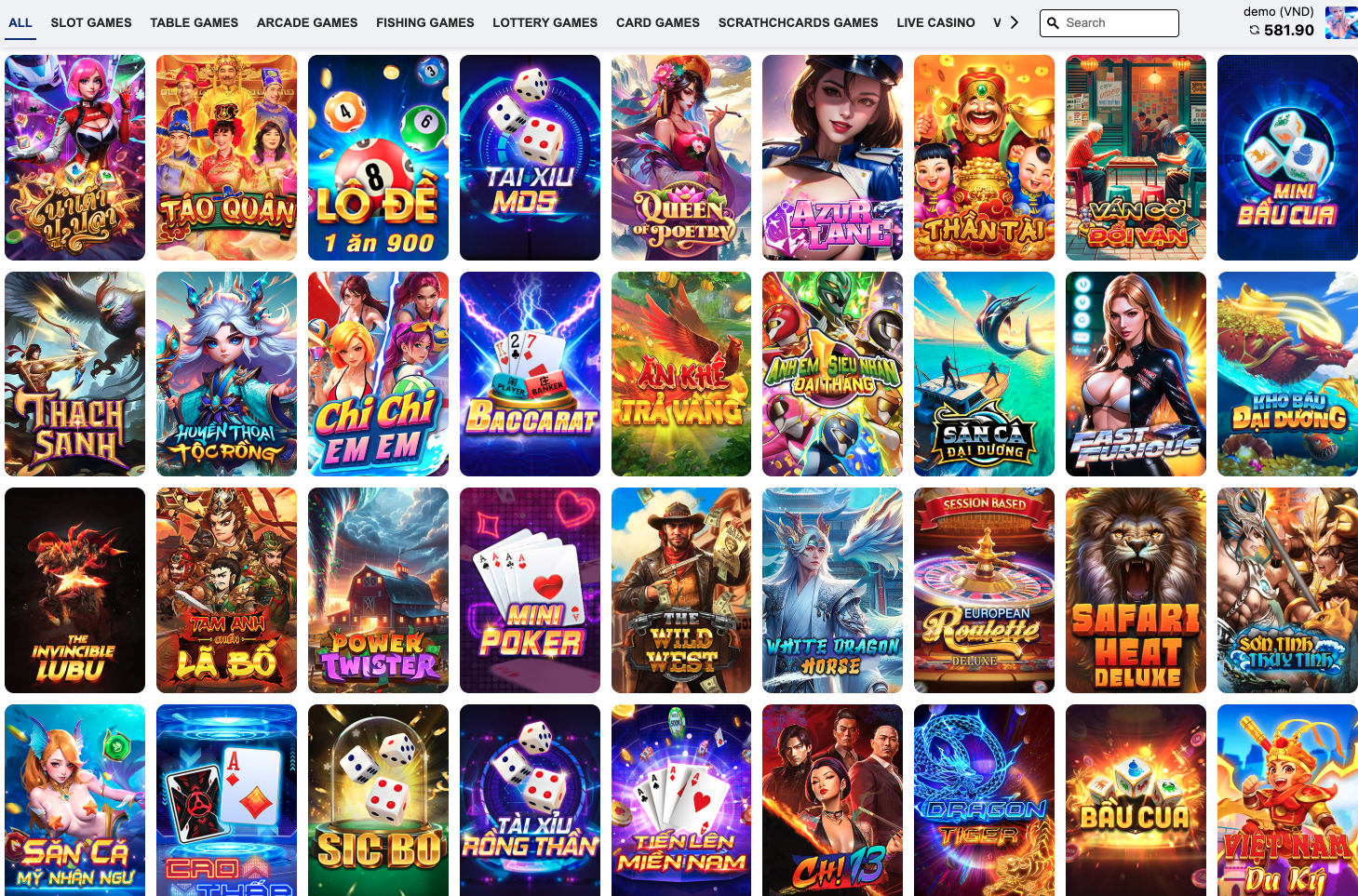
Load Web Lobby via SDK
Step 1
Include the following line in the HTML:
<link
  rel="stylesheet"
  href="https://s.ssn-571.com/libs/lobby53/v1.0.7/style.css"
/>
<script
  src="https://s.ssn-571.com/libs/lobby53/v1.0.7/index.umd.js"
  id="lobbyScript"
></script>
Step 2
After script loaded, we can use WebLobby53 to append list games to the pre-prepared area.
WebLobby53.render({
  eltId: '<<ELEMENT_ID>>',
  tenantId: '<<TENANT_ID>>',
  language: '<<LANGUAGE>>',
  currency: '<<CURRENCY>>',
  playerTenantToken: '<<PLAYER_TENANT_TOKEN>>',
});
| Parameter name | Data Type | Mandatory | Description |
|---|---|---|---|
| eltId | String | Yes | Load game in here |
| tenantId | String | Yes | Your Tenant ID, you can get it on N11s Back |
| language | String | No | Display language of game[3] Default: en (If you don't pass a language or the language is not supported) |
| currency | String | No | Display language of game[4] Default: usd |
| tenant_player_token | String | Yes | Your player's token, pass it via URL of iframe do to VerifySession inside the game |
Step 3
If you want to change style of the lobby. We provide global class names that don't change it when the SDK is updated or rebuilt with a new version.
Prefix: n11s-
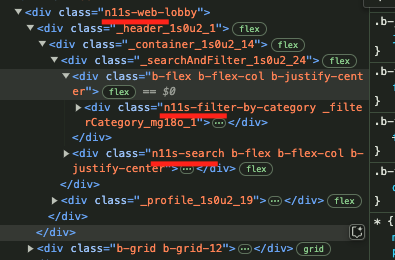
Some additional code sample
In some cases, we need add async in script
<script
  src="https://s.ssn-571.com/libs/lobby53/v1.0.7/index.umd.js"
  id="lobbyScript"
  async
></script>
Then, We need to wait for the the script load completed.
document.getElementById('lobbyScript')?.addEventListener('load', function () {
  WebLobby53.render({
    eltId: '<<ELEMENT_ID>>',
    tenantId: '<<TENANT_ID>>',
    language: '<<LANGUAGE>>',
    currency: '<<CURRENCY>>',
    playerTenantToken: '<<PLAYER_TENANT_TOKEN>>',
  });
});
Or, There is some sample to load SDK (with async) if you need:
const injectScript = () => {
  const style = document.createElement('link');
  style.rel = 'stylesheet';
  style.href = 'https://s.ssn-571.com/libs/lobby53/v1.0.7/style.css';
  document.head.appendChild(style);

  const script = document.createElement('script');
  script.src = 'https://s.ssn-571.com/libs/lobby53/v1.0.7/index.umd.js';
  script.async = true;
  script.id = 'lobbyScript';
  document.body.appendChild(script);
};

const load = () => {
  const render = () => {
    WebLobby53.render({
      eltId: '<<ELEMENT_ID>>',
      tenantId: '<<TENANT_ID>>',
      language: '<<LANGUAGE>>',
      currency: '<<CURRENCY>>',
      playerTenantToken: '<<PLAYER_TENANT_TOKEN>>',
    });
  };

  try {
    render();
  } catch {
    console.warn('We need load script first');
    document
      .getElementById('lobbyScript')
      ?.addEventListener('load', function () {
        render();
      });
  }
};

// Invoke 2 functions above
injectScript();
load();
If we need typescript (TS), we need create a file name: global.d.ts in src folder
declare global {
  const WebLobby53: {
    render: (s: {
      eltId: string;
      tenantId: string;
      playerTenantToken: string;
      language: string;
      currency: string;
    }) => void;
  };
}

export {};
Please monitor page loading performance and caching appropriately.
Load Web Lobby via URL
It's very much the same with launch a game, because we consider Web Lobby is just a game so you can build an URL like this to load the Web Lobby
API URL : {n11s_static_domain}/games/lobby53/index.html?language={language}¤cy={currency}&tenant_id={tenant_id}#tenant_player_token={tenant_player_token}
HTTP method : GET
All parameters are same meaning and explain in the section above URL Parameters
References
[1]
Please refer to VerifySession section for more information.
[2]
Please get the latest list from N11s
[3]
Please refer to Languages section for complete list
[4]
Please refer to Currencies section for complete list